I A LITTLE INTRODUCTION
Ship today.
Proofread
tomorrow.
Quaso is an open-source tool for translating games. With a Gemini key, uploads can queue machine translations for review. Download accepted translations into your next build, then include your team's fixes in later builds.
Free & open source. Bring your own keys.

ÇA SENT LE PAIN GRILLÉ
- Translated by the LLMMonday’s build
IT SMELLS LIKE TOAST
- Proofread by AlexFriday’s build
YOU’RE TOAST
Both translations appear in a game build.
II WHY QUASO
Choose when
to release.
Decide which languages need proofreading before release. You can include accepted machine translations in a build and add reviewed changes in later builds.
A release after proofreading
- Week 1Freeze the strings and send them to translators.
- Weeks 2–4Translate and proofread the text.
- Week 5Release the reviewed languages.
Example plan: finish proofreading before release.
With Quaso
- MondayUpload the new strings and run a translation job.
- MondayCheck the results and release the completed languages.
- All weekYour team and community proofread, whenever suits them.
- FridayDownload accepted fixes for the next build.
Example plan: release checked machine translations, then proofread.
Keep proofread translations.
The LLM does not replace a proofread translation. With proposals enabled, a source change can produce an update for a manager to review.
Check the text structure.
LLM results must pass placeholder, plural, and length checks before they are saved. A failed result leaves the previous value in place. People still need to check meaning and tone.
Strict where it counts.
Want a language fully proofread before launch day? Add
quaso status --fail-on untranslated,outdated,greento your build. A matching state makes the command fail; review QA and pending counts separately.
III FROM YOUR REPOSITORY TO THE WORLD
Four steps.
From text to build.
Follow Quaso Quest from French to English. This example uses a machine translation first, then adds a person's changes in a later build.
Give Quaso a home.
Copy the deployment files, set your domain and setup key, and start Docker Compose. Create your admin account in the browser and paste in your Gemini API key. Your translation space is ready.
# With your deployment files configured docker compose up -dQuaso app SQLiteUpload and translate.
Install the CLI in your game’s repository and upload your source files whenever the story grows. With a Gemini key and automatic translation enabled, uploads queue work for new and changed strings. Check the job result before downloading.
src/locales/fr/*.jsonQuasonpm i -D @quaso-i18n/cli@main # Connect to your instance export QUASO_HOSTNAME=translate.yourgame.com export QUASO_API_KEY='your upload API key' # French in, English and German out npx quaso init --source fr --languages en,de # Upload, and wait while the LLM translates npx quaso upload --waitDownload for your build.
Download accepted translations into your game's language folders. Missing translations use source text by default; outdated translations remain included. Check the files in your game before release. The game needs no Quaso connection.
Try the Quaso Quest walkthroughnpx quaso download # src/locales/en/game.json # src/locales/de/game.json # Ready for tonight’s build.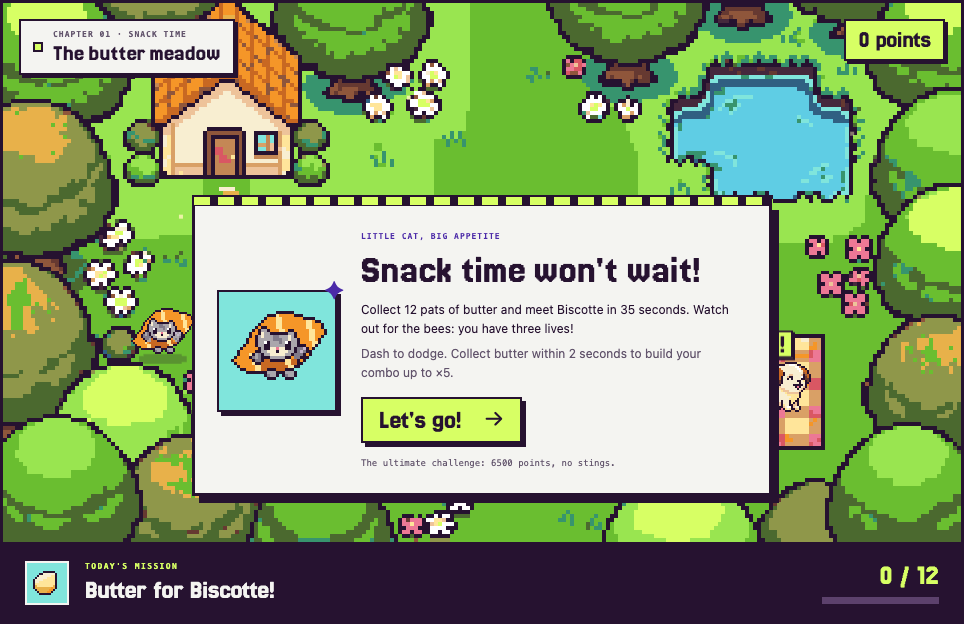
The example game running in English, before anyone proofread its dialogue. Proofread at your own pace.
Your team and your community proofread in the browser, with the source, placeholders and plural forms right beside them. The LLM never overwrites their proofread work. Your next download includes accepted fixes for your build.
- UntranslatedDownloads use source text by default.
- TranslatedAccepted for download; not yet proofread.
- ProofreadChecked by a person and accepted for download.
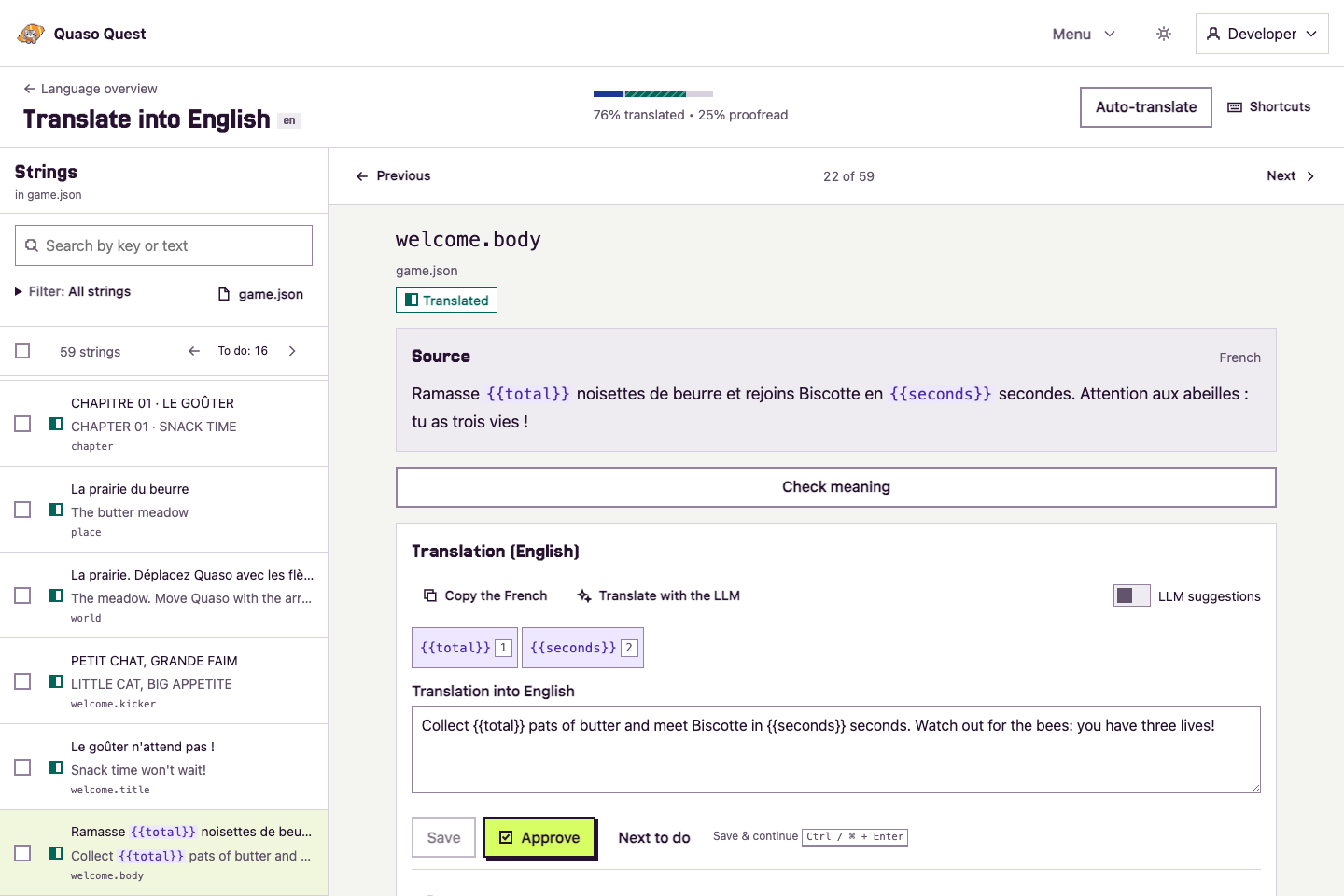
French → English, inside the real Quaso workspace. Take a closer look at the workspace Progress, reviews & dark mode
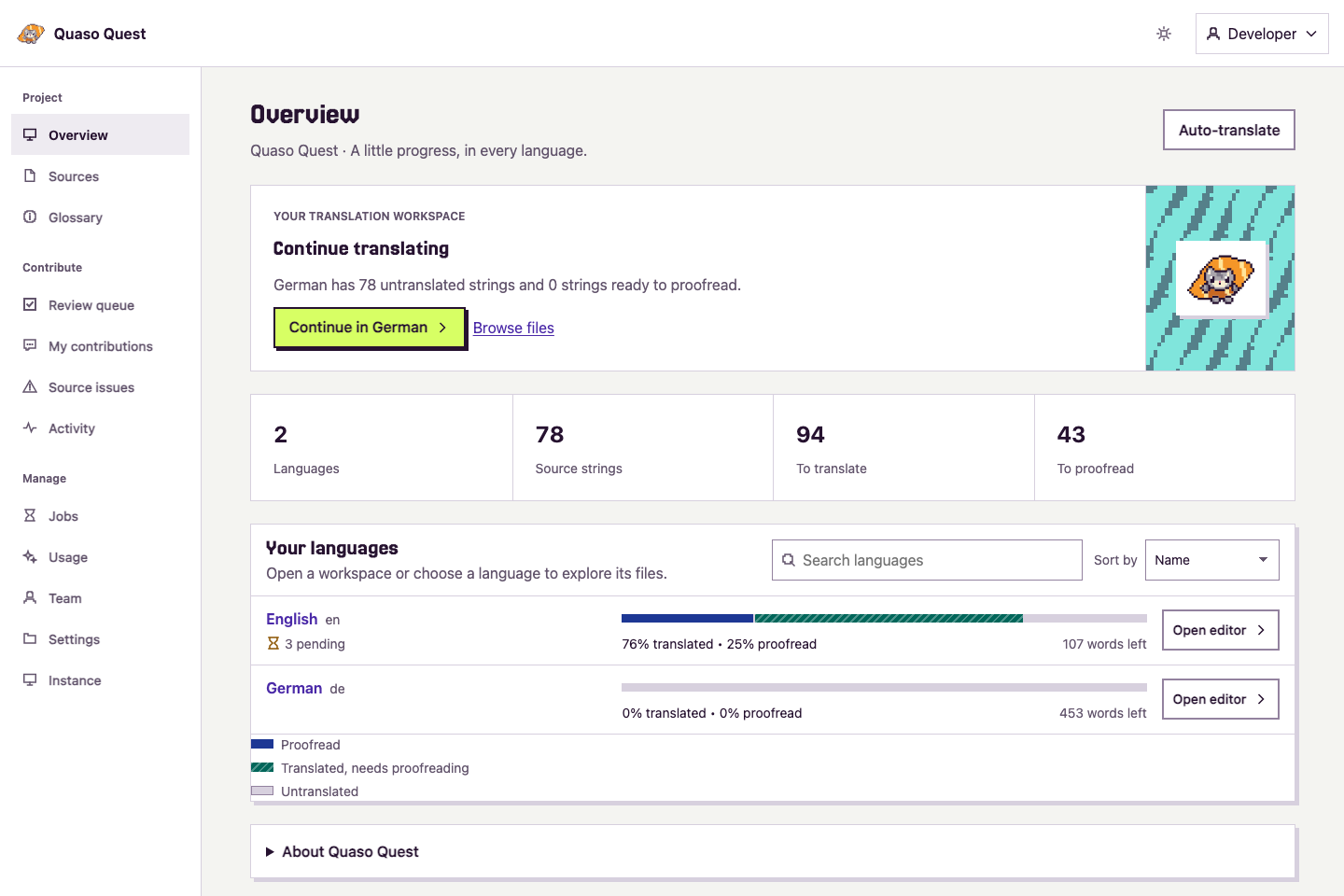
See how much is translated, and how much is proofread. 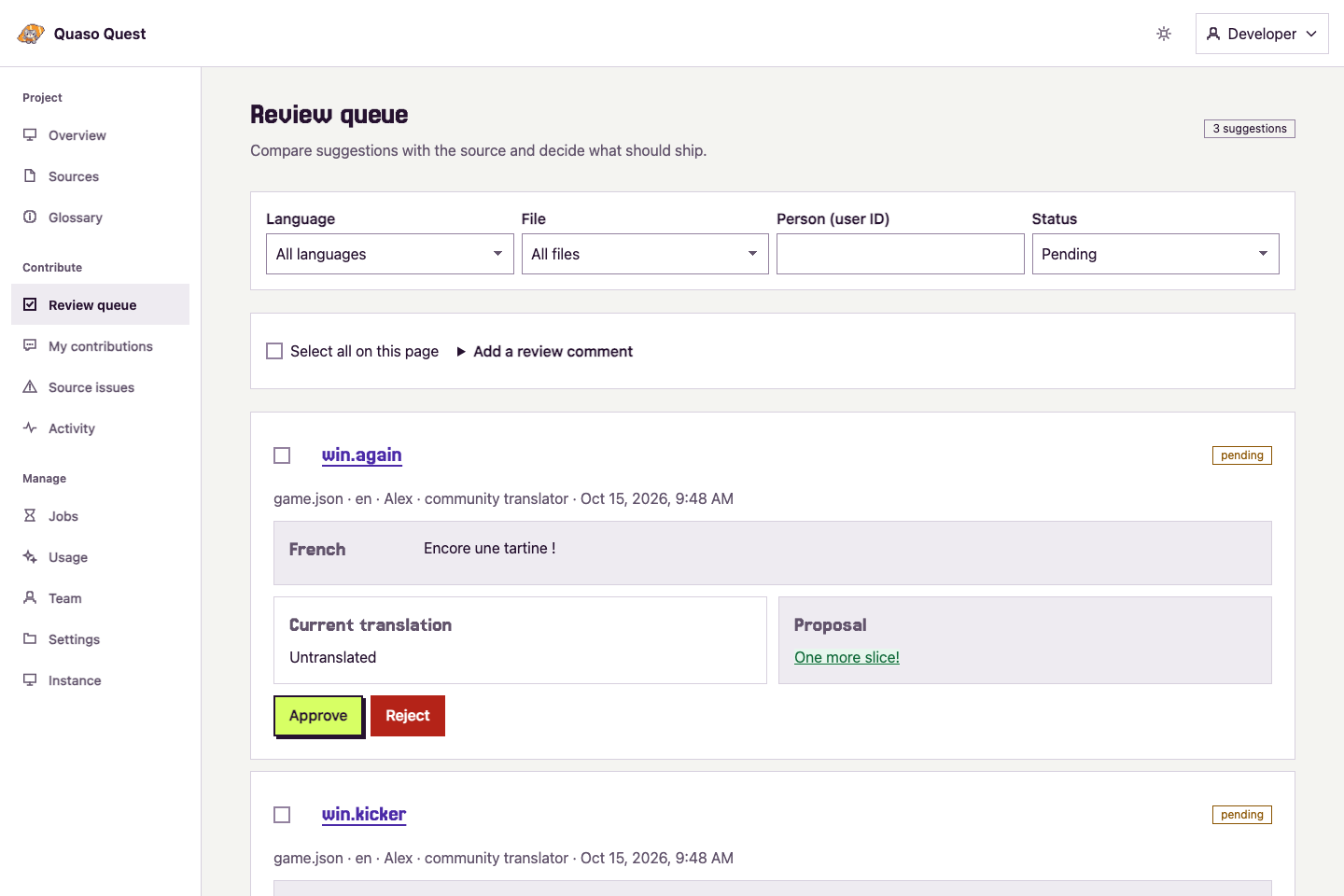
Give community suggestions a second pair of eyes. 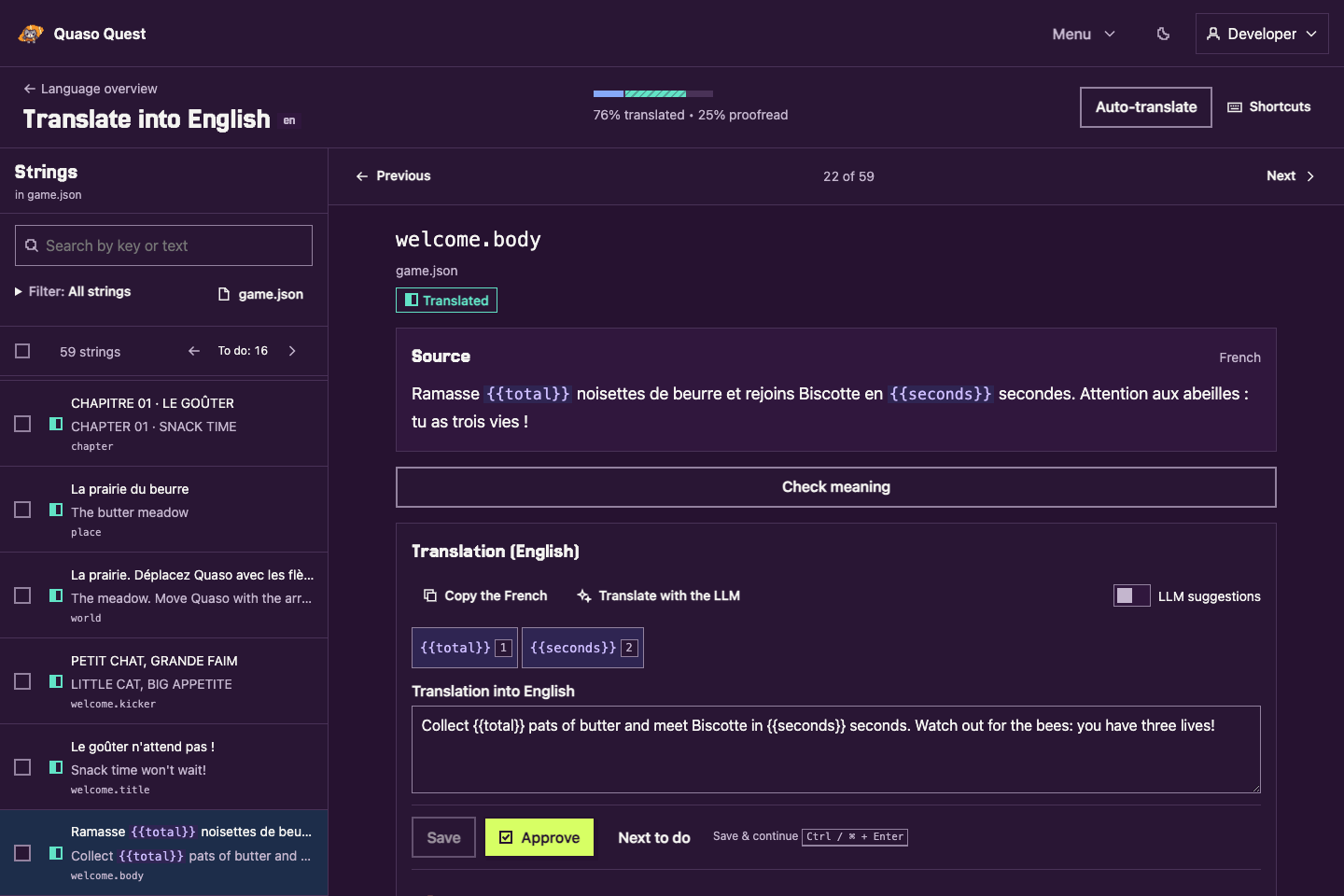
Late-night proofreading? Make yourself comfortable.
Steps two to four repeat with every build. Put them in CI, and each release picks up whatever was translated and proofread since the last one.
Automate it in CIIV MADE FOR SMALL TEAMS
Small team?
Big world.
Translation should feel like part of making your game. Here are six more ways Quaso keeps it that way.
 01
01Open source. All yours.
MIT licensed and self-hosted. Run your own instance and change the source to fit your project.
You pay for hosting and external services. 02
02Host it your way.
One Quaso container and a SQLite database. Run it on your own virtual machine with Docker Compose, or deploy on Cloudflare.
Your hosting. Your budget. 03
03Your LLM key. Your call.
Bring your Gemini API key. Choose the model, write the instructions, set a monthly token budget, and pay your provider directly.
Pay the provider directly. 04
04Built for your team.
Managers edit and proofread translations. Contributors suggest changes for review. Visitors can read source text and translations without an account.
People give every language its voice. 05
05Made for game strings.
i18next and ICU MessageFormat, with placeholders and plural forms in JSON strings or whole Markdown documents. Choose your project’s message format in Settings → Placeholders. Check structure and length before accepting a translation.
JSON and Markdown · i18next or ICU MessageFormat 06
06Ship files. Keep your freedom.
Translations come back as ordinary files in your repository. Your game runs on its own, with no connection to Quaso.
Fits your build. Works in CI.
MADE FOR GAMES. AND THE PEOPLE WHO MAKE THEM.
Your next player
is out there.
Ship their language with your next build. Make it better with every one after.
From your first upload to release day.
Bring your translations along.